

Want to Chat with ChatGPT, Claude, and Gemini at the Same Time? Try MEWZ Multi Chat
▶ Use up to three AI models—including ChatGPT, Claude, and Gemini—on a single screen and compare their responses to the same question with MEWZ Multi Chat. ▶ MEWZ provides an AI environment designed for education, helping instructors prepare lessons and learning materials while enabling students to study concepts and complete assignments and reports more efficiently.
Hello!
We are MEWZ, the all-in-one AI education platform for students, instructors, and institutions.
Which AI is best suited for school lessons and assignments—ChatGPT, Claude, or Gemini?
Each AI has its own strengths, making it difficult to rely on just one. At the same time, switching between multiple windows can make comparing responses and organizing results even more time-consuming.
For a more convenient AI experience designed for schools, we recommend MEWZ.
With MEWZ Multi Chat, you can use and compare up to three AI models on a single screen, helping you find the most suitable results for your teaching and learning needs more efficiently.
Let’s take a look at how to use MEWZ Multi Chat and how instructors and students can make the most of it.
What Is MEWZ Multi Chat?
MEWZ Multi Chat allows you to communicate with up to three AI models, including ChatGPT, Claude, and Gemini, simultaneously on a single screen.
You can enter the same question into each AI and compare their responses side by side, or enter different questions to work on multiple tasks at the same time.
You can also open the same AI model in all three chat windows and use each window for a different task.
Since there is no need to open multiple AI services separately, you can compare and organize the information needed for lesson preparation and assignments more conveniently.
How to Use MEWZ Multi Chat
Step 1. Start a Chat in MEWZ
Log in to MEWZ and select the AI model you want from the left-side menu or the AI Home screen to start chatting.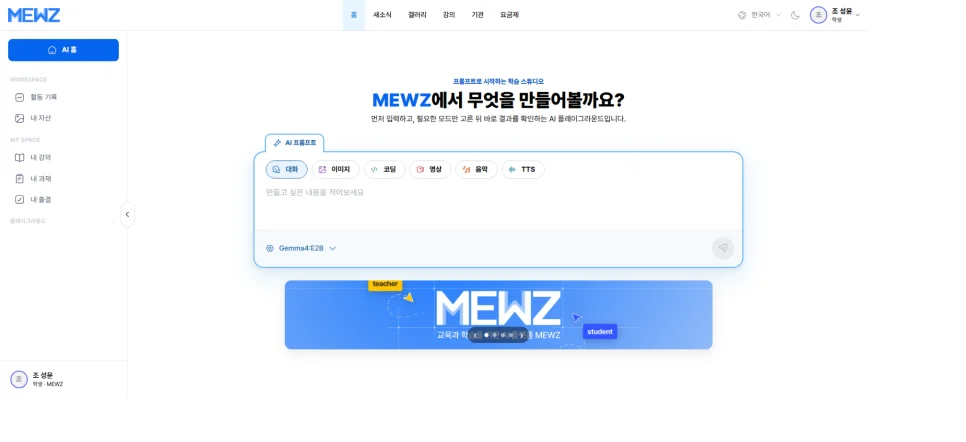
Step 2. Add AI Models to Your Chat Screen
Once you start a chat, you can add additional chat windows to the screen.
Place ChatGPT, Claude, and Gemini side by side to compare their responses, or open the same model in all three windows for different purposes.
(Paid models are available using tokens.)
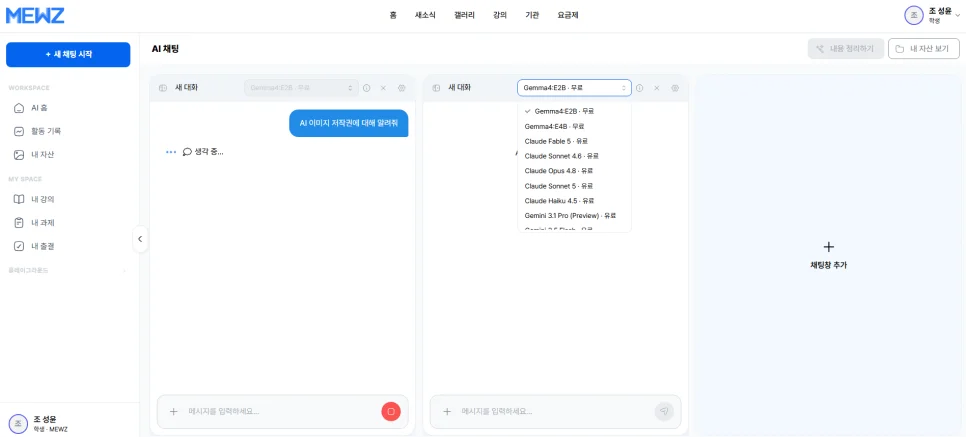
You can enter either the same question or different questions in each chat window.
Ask the same question: Compare responses and perspectives from different AI models at a glance.
Ask different questions: Conduct research, organize ideas, and work on writing tasks simultaneously.
Use the same model with different questions: Separate each chat window by task for more organized workflows.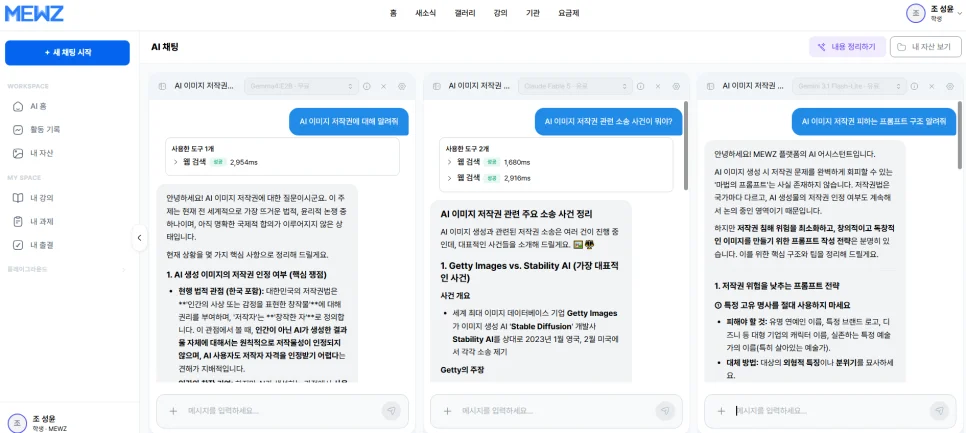
AI for Schools: How to Use MEWZ Multi Chat
MEWZ Multi Chat can be used in various ways depending on your purpose—from instructors preparing school lessons to students using AI for assignments and learning.
👨🏫 For Instructors
Compare and review lesson plans — Compare lesson structures suggested by three AI models side by side and select the most suitable approach.
Create explanations for different learning levels — Ask AI to explain the same concept at different difficulty levels and prepare examples suited to students’ learning levels.
Develop richer teaching materials — Analyze the same topic from multiple AI perspectives to create more comprehensive lesson content.
✏️ For Students
Compare explanations of difficult concepts — Ask three AI models the same question and choose the explanation that is easiest to understand.
Explore ideas for assignments and reports — Receive multiple perspectives at once and use them to improve the quality of your writing.
Find useful learning information more efficiently — Compare AI responses to the same question and select the information that is most relevant to your learning.
MEWZ is an all-in-one AI education platform designed to help instructors and students use a variety of AI services in one place and conveniently compare the results they need.
If you are looking for AI designed for school lessons and assignments, start with MEWZ Multi Chat.
Both instructors and students can communicate with up to three AI models simultaneously without complicated settings or constantly switching between services.
Try Multi Chat on MEWZ today!
Curious about bringing NVEX to your team?
Talk to us →